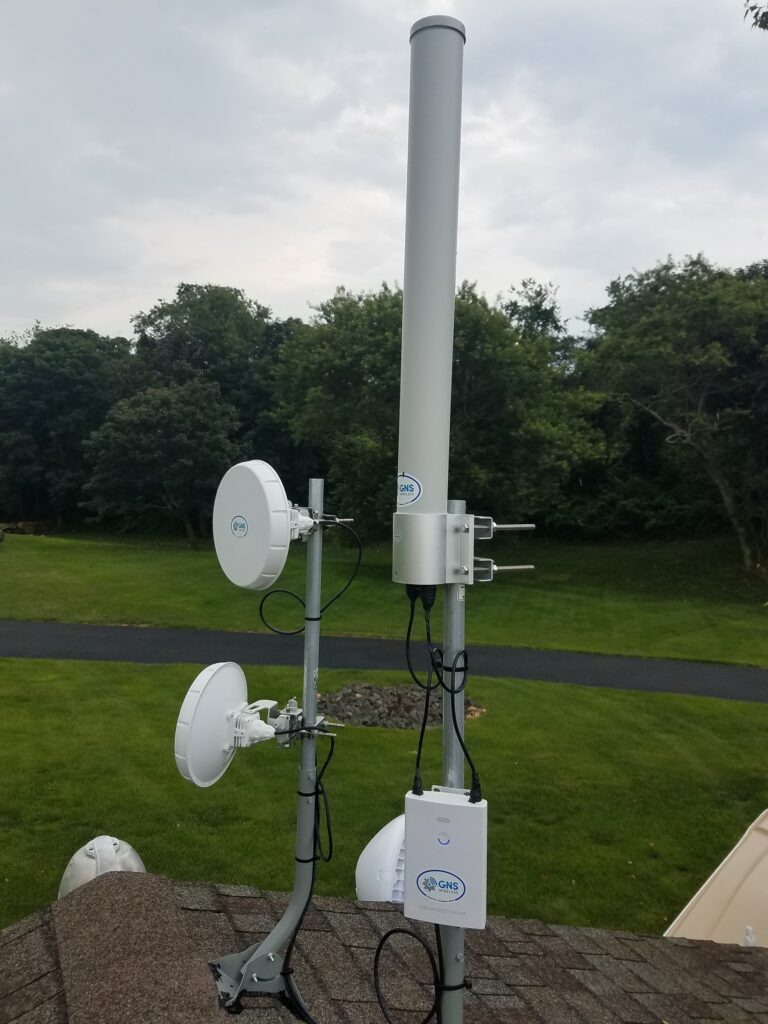
Best Wireless Bridge for Connecting Your House to a Garage, Shed, or Remote Building (Without Trenching)

best wireless bridge

If you’re searching for the best wireless bridge, you’re probably trying to do something simple:

  • Get internet from your house to a detached garage
  • Connect a shed, barn, workshop, or outbuilding
  • Extend your network to a pool house or guest house
  • Stream video to a Smart TV in another building
  • Send security camera video back to your main network

Most people start on Amazon because it looks cheap and easy.

Sometimes it works — but a lot of times it turns into disconnects, buffering, and endless troubleshooting. Furthermore…who do you call when it doesn’t work? Amazon?

This guide will help you choose the right type of bridge, avoid common mistakes, and point you to a reliable solution that’s actually built for outdoor use.


What Is a Wireless Bridge?

A wireless bridge is a pair of outdoor radios that connect two locations wirelessly—so your network behaves like you ran a cable between buildings.

Instead of trenching Ethernet or fiber, you mount one unit on each building and create a dedicated “wireless cable” through the air.

Wireless bridges are commonly used for:

  • internet extension
  • building-to-building networking
  • cameras and remote monitoring
  • streaming and Smart TV connectivity

Why “Amazon Wireless Bridge Kits” Often Disappoint Outdoors

Amazon is full of wireless bridge kits that claim long range and high speed. The problem is that outdoor wireless performance depends on real-world conditions.

Here are the top reasons cheap kits fail:

1) Trees and Obstacles Matter (A Lot)

Most wireless bridges need clear line-of-sight. Trees, branches, and buildings can cause:

  • weak signal
  • slow speed
  • unstable connections

2) Range Claims Are Often Best-Case Only

Many listings show big distance numbers, but those are usually based on ideal conditions—not real installs.

3) “It Works” Isn’t the Same as “It Works Well”

Some kits connect, but struggle under load:

  • streaming
  • Zoom / Wi-Fi calling
  • multiple users
  • camera traffic

4) No Help When You Need It

When you hit setup issues (alignment, placement, interference), most Amazon products don’t come with real support.


The Best Low-Cost Wireless Bridge Option (That’s Still a Real Outdoor Solution)

If your goal is the cheapest way to connect two nearby buildings, and you have open line-of-sight, the best move is choosing a real outdoor bridge kit from a company that actually supports it.

👉 Budget Outdoor Wireless Bridge Kit from GNS Wireless
This is a great option for:

  • house → garage
  • house → shed
  • small outbuilding links
  • basic internet extension

Best part: you’re not stuck guessing. If you need help selecting the right bridge, mounting it, or setting it up, you can talk to a real team.

( “Budget Outdoor Wireless Bridge Kit” → GNS-1193AC)


When You Should Upgrade (Worth It)

If you need better speed, longer distance, or more reliability—especially for video/cameras—upgrade to a stronger point-to-point bridge.

👉 High-Performance Wireless Bridge Options from GNS Wireless


Bottom Line

If you want the cheapest possible gamble, Amazon might get you connected.

But if you want:

  • stable outdoor performance
  • less troubleshooting
  • real help when needed
  • Support from people who live in the USA

A budget outdoor wireless bridge kit from GNS Wireless is the smarter move.


FAQ

What is the best wireless bridge for house to garage internet?

A wireless bridge kit designed for outdoor use is the best option. For short-range links with clear line-of-sight, a budget bridge kit from GNS Wireless is a strong value.

Will a wireless bridge work through trees?

Not reliably. Line-of-sight is extremely important. Trees and foliage can weaken or break the link. For short ranges, yes, we can offer a couple of the older 2.4 GHz point to point links. For longer distances, it really depends on what the distance is, and what percentage of that distance is obstructed. Further, it depends on how dense the obstructions are, and what capacity you are looking for. Ultimately, it is best to give us a call and we can go over it. (877) 209-5152

Is a wireless bridge better than a Wi-Fi extender?

Yes. A bridge creates a dedicated connection between buildings. Extenders usually reduce speed and are less stable outdoors.

Can a wireless bridge run security cameras?

Yes. For heavier camera loads, choose a higher performance bridge for better throughput and stability.

Why Campground Wi-Fi Fails Without Proper Enclosures and Configuration

outdoor Wi-Fi planning

When campground Wi-Fi struggles, the access points usually get blamed.
In reality, many campground networks fail for reasons that have nothing to do with radios.

The most common issues come from exposed infrastructure, power problems, and generic configurations that don’t match how campgrounds actually operate.

Reliable campground Wi-Fi depends on more than coverage — it depends on how the system is protected and configured.


The Outdoor Reality of Campground Wi-Fi

Campground Wi-Fi equipment lives in harsh conditions:

  • Rain, humidity, and condensation
  • Extreme heat and cold
  • Dust, insects, and debris
  • Power fluctuations and lightning events

Unlike indoor networks, outdoor systems must survive the environment year-round.

This is where many campground Wi-Fi systems quietly fail.


Why NEMA Enclosures Matter in Campgrounds

Campground Wi-Fi equipment is often installed:

  • On poles
  • On maintenance buildings
  • Near pedestals or utility areas
  • Far from climate-controlled spaces

Without proper NEMA-rated enclosures, common problems appear:

  • Moisture entering power and network components
  • Heat buildup causing reboots or premature failure
  • Corrosion on connections
  • Random outages after storms

A properly designed enclosure provides:

  • Weather protection
  • Thermal management
  • Clean power distribution
  • Easier maintenance and troubleshooting

For campgrounds, enclosures often matter more than the access points themselves.

Seeing Wi-Fi issues after storms or during peak hours?
That’s often an infrastructure or configuration problem — not a coverage problem.

Learn how campground Wi-Fi planning works


Power and Protection Are Often Overlooked

Many campground Wi-Fi issues trace back to power problems:

  • Long cable runs causing voltage drop
  • Improper grounding
  • No surge protection
  • Power shared with unreliable loads

These issues don’t always cause immediate failure. Instead, they create:

  • Intermittent outages
  • Performance that degrades over time
  • Equipment that fails mid-season

Good Wi-Fi design accounts for power quality, grounding, and protection from the start.


Why Default Configurations Don’t Work for Campgrounds

Most Wi-Fi systems ship with default configurations designed for offices or homes — not campgrounds.

Campgrounds behave very differently:

  • Heavy usage in the evenings
  • Hundreds of transient devices
  • Guests moving throughout the property
  • Streaming and video dominating traffic

Without custom configuration:

  • Some users consume disproportionate bandwidth
  • Roaming becomes unstable
  • Performance collapses during peak hours

Configuration determines whether campground Wi-Fi is merely available or actually usable.


Cloud-Managed vs Custom-Configured Networks

Cloud management can be helpful, but only when it’s configured intentionally.

What matters most is not where the configuration lives, but how it’s tuned:

  • Fair bandwidth distribution
  • Stable roaming behavior
  • Traffic handling that matches campground usage

Generic, “one-size-fits-all” settings are a common reason campground Wi-Fi fails even with good equipment.


The Bigger Picture: Campground Wi-Fi Is a System

Successful campground Wi-Fi systems account for:

  • Outdoor exposure
  • Power and protection
  • Enclosures and mounting
  • Real usage patterns
  • Long-term reliability

Access points are only one part of that system.


Final Takeaway

If campground Wi-Fi works one day and fails the next — especially after weather or during busy periods — the issue is rarely coverage alone.

More often, it’s:

  • Inadequate enclosures
  • Power and protection problems
  • Configurations that don’t match campground use

Reliable campground Wi-Fi starts with planning for the environment, not just the signal.

If campground Wi-Fi reliability matters, start with the system — not just the access points.

Contact GNS WiFi for campground Wi-Fi planning

Why Adding More Access Points Can Make Outdoor Wi-Fi Worse

adding more access points outdoor Wi-Fi

When outdoor Wi-Fi performance drops, the most common reaction is simple:
“Let’s add another access point.”

Sometimes that works—briefly.
More often, it makes the problem worse.

In large outdoor environments like campgrounds, RV parks, marinas, farms, and industrial sites, adding access points without a plan can reduce speeds, increase disconnects, and create instability across the entire network.


Why “More Access Points” Sounds Like the Right Answer

On the surface, the logic makes sense:

  • More access points = more coverage
  • More signal = better performance

This assumption works indoors, in controlled environments with short distances and limited interference.

Outdoors, it breaks down quickly.


What Actually Happens When You Add Too Many Access Points

1. Self-Interference Increases

Access points share the same limited wireless channels. When too many are placed too close together, they begin competing with each other instead of helping.

The result:

  • Slower speeds
  • Increased latency
  • Frequent retries and dropped connections

2. Roaming Becomes Unstable

Outdoor clients—phones, tablets, smart TVs—don’t roam intelligently. When access points overlap too much, devices cling to weak connections instead of switching cleanly.

Users experience:

  • Strong signal but poor performance
  • Random disconnects
  • Streaming that constantly buffers

3. Backhaul Gets Overloaded

Even if access points are spaced correctly, the network behind them may not be designed to carry the added traffic.

If backhaul links or upstream connections aren’t planned for growth:

  • Adding access points increases congestion
  • Performance drops everywhere, not just at the edge

This is where many outdoor networks fail silently.


Coverage Is Not the Same as Performance

This issue ties directly back to a key concept many property owners miss:
coverage and capacity are not the same thing.

A network can look “fully covered” and still perform poorly if:

  • Too many users share limited throughput
  • Access points compete for airtime
  • Backhaul links are undersized

We covered this distinction in detail in
Outdoor Wi-Fi Coverage vs Capacity: What Property Owners Get Wrong.


When Adding Access Points Does Make Sense

Adding access points can help—but only when it’s done intentionally.

It works when:

  • Coverage gaps are clearly identified
  • Channel planning is adjusted accordingly
  • Backhaul capacity is increased if needed
  • Access points are placed based on usage, not distance alone

Without those steps, additional hardware often causes more harm than good.


Why Planning Must Come First

Most outdoor Wi-Fi problems blamed on “bad equipment” are actually design problems.

As explained in
Why Outdoor Wi-Fi Fails — and How Proper Planning Fixes It,
successful networks are designed around:

  • Property layout and terrain
  • User behavior and peak usage
  • Clear separation between coverage and backhaul
  • Scalable architecture

Hardware only works when the design supports it.


Access Points vs Network Architecture

Access points are just one part of an outdoor network.

As discussed in
Point-to-Point vs Access Points: When Each One Makes Sense Outdoors,
reliable systems separate roles:

  • Point-to-point links move data between areas
  • Access points serve users locally

When those roles blur, performance suffers.


The Real Fix: Fewer Devices, Better Design

Counterintuitively, many outdoor Wi-Fi networks improve when:

  • Excess access points are removed
  • Coverage is tightened instead of stretched
  • Interference is reduced
  • Traffic paths are simplified

Better performance often comes from less hardware, not more.


Final Takeaway

If outdoor Wi-Fi gets worse every time you add equipment, the issue isn’t quantity—it’s design.

More access points without a plan increase interference, overload backhaul, and degrade user experience.

The solution isn’t adding more hardware.
It’s designing the network correctly from the start.

If adding access points hasn’t solved your problem, start with the design.

Contact GNS WiFi to plan your outdoor network

(877) 209-5152

support@gnswireless.com

Frequently Asked Questions About Outdoor Wi-Fi Expansion

Does adding more access points improve outdoor Wi-Fi?

Not always. In many outdoor networks, adding access points increases interference and congestion, which can reduce performance instead of improving it.


Why does outdoor Wi-Fi get worse with strong signal?

Strong signal only indicates coverage, not performance. If multiple access points compete for the same channels or overload the network backhaul, performance suffers even with excellent signal strength.


How many access points are too many outdoors?

There is no fixed number. The right quantity depends on property size, layout, user density, channel availability, and backhaul capacity. More devices without proper planning often create interference.


What causes interference in outdoor Wi-Fi networks?

Interference commonly comes from overlapping access points, poor channel planning, neighboring networks, and reflective surfaces like water, metal RVs, or industrial equipment.


Can removing access points improve Wi-Fi performance?

Yes. In some cases, removing poorly placed or unnecessary access points reduces interference and stabilizes performance across the network.


Why does Wi-Fi work near the office but not farther away?

Networks are often designed for coverage near the main building without properly extending backhaul or capacity to distant areas. This creates strong signal near the source and poor performance elsewhere.


When should access points be added to an outdoor network?

Access points should be added only after identifying true coverage gaps, adjusting channel plans, and confirming the network can handle the additional traffic.


What’s the right first step when outdoor Wi-Fi performance is poor?

The first step is evaluating the network design. Most outdoor Wi-Fi issues stem from planning and layout problems, not equipment failure.

Installing a High-Performance Point-to-Point Wireless Link with the SX3 QuickBridge

point to point wireless bridge installation

When trenching fiber isn’t practical—or even possible—a point-to-point wireless link is often the fastest, most cost-effective way to extend a network between buildings. For industrial, commercial, and campus environments, reliability and throughput matter just as much as ease of deployment.

One solution that continues to stand out in real-world installations is the SX3 QuickBridge (Part # SX3-1021A-QB-US) from Proxim.

In this post, we’ll walk through how the SX3 QuickBridge is typically installed, where it performs best, and why it’s an excellent choice for demanding outdoor links.


What Is the SX3 QuickBridge?

The SX3-1021A-QB-US is a pre-paired, license-free 5 GHz point-to-point wireless bridge designed for fast deployment. Unlike systems that require complex configuration or cloud licensing, the QuickBridge ships factory-paired—meaning both radios are already matched and ready to form a secure link.

This makes it ideal for:

  • Building-to-building connectivity
  • Extending networks to warehouses, barns, shops, or remote offices
  • Temporary or permanent industrial links
  • Sites where fiber trenching is cost-prohibitive

Typical SX3 QuickBridge Installation Overview

1. Mounting the Radios
Each radio is mounted outdoors—typically on a pole, wall, or rooftop mast—with clear line-of-sight between locations. Precision alignment is important, but the integrated antenna and signal indicators simplify this process.

2. Power & Network Connection
The SX3 QuickBridge uses standard Power over Ethernet (PoE). A single Ethernet cable provides both power and data, minimizing cable runs and installation time.

3. Alignment & Link Establishment
Once powered, the radios automatically establish their encrypted link. Installers then fine-tune alignment to maximize signal strength and throughput.

4. Network Integration
The bridge behaves like a transparent Ethernet cable—no routing, no subscriptions, no recurring fees. It simply extends your LAN.


Why Installers Like the SX3 QuickBridge

  • Pre-configured & paired – no RF engineering required
  • Enterprise-grade reliability for industrial environments
  • Secure wireless encryption out of the box
  • High throughput suitable for cameras, VoIP, file transfers, and internet backhaul
  • No licensing or monthly fees

This makes it especially attractive for facilities managers and IT teams who want predictable performance without ongoing costs.


Real-World Use Cases

  • Extending internet from a main office to a detached warehouse
  • Connecting manufacturing buildings across a yard or roadway
  • Providing network access to remote monitoring stations
  • Temporary links during construction or site expansion

Where to Buy the SX3 QuickBridge

For customers looking to purchase the SX3-1021A-QB-US, we recommend sourcing it through GNS Wireless, where it’s available as a ready-to-deploy solution with expert support:

👉 View the SX3-1021A-QB-US on GNSWireless.com


Need Help Designing or Installing a Link?

If you’re unsure about distance, line-of-sight, mounting options, or power availability, our team can help design a reliable point-to-point solution tailored to your site.

Contact us for guidance before you install.

FAQ Section

Frequently Asked Questions – Point-to-Point Wireless Installation

What is a point-to-point wireless bridge?

A point-to-point wireless bridge connects two separate locations using dedicated radios that communicate only with each other, effectively replacing a physical Ethernet or fiber cable without trenching.


How far can a point-to-point wireless link reach?

Distance depends on frequency, antenna design, and line-of-sight. In clear line-of-sight environments, industrial-grade bridges like the SX3 QuickBridge can reliably span thousands of feet or more.


Does a point-to-point wireless bridge require internet access?

No. A point-to-point bridge simply extends an existing network. It can carry internet traffic, camera feeds, VoIP, or internal LAN traffic.


Is line-of-sight required for wireless bridges?

Yes. Clear line-of-sight is critical for reliable performance, especially at 5 GHz. Trees, buildings, and terrain can reduce throughput or cause instability.


How is a point-to-point wireless bridge powered?

Most outdoor wireless bridges, including the SX3 QuickBridge, use Power over Ethernet (PoE), allowing power and data to run through a single Ethernet cable.


Are wireless bridges secure?

Yes. Modern point-to-point bridges use encrypted links, ensuring data stays private between the two endpoints.


Is a wireless bridge better than trenching fiber?

In many cases, yes. Wireless bridges install faster, cost less, and avoid permitting, trenching, and restoration—while still delivering high performance.

Point-to-Point vs Access Points: When Each One Makes Sense Outdoors

outdoor wireless network design

One of the most common mistakes in outdoor Wi-Fi expansion is using the wrong tool for the job.

Property owners often try to solve every coverage problem with access points—or, just as often, assume a long-range wireless link will magically provide Wi-Fi everywhere. Both approaches lead to frustration when they’re applied incorrectly.

Understanding the difference between point-to-point wireless links and Wi-Fi access points is critical to designing an outdoor network that works reliably.


What a Wi-Fi Access Point Is Designed to Do

A Wi-Fi access point is built to serve users.

Its primary role is to:

  • Provide wireless connectivity to phones, laptops, TVs, and devices
  • Share bandwidth among multiple users
  • Deliver coverage within a defined area

Access points are ideal for:

  • Campsites, RV rows, and common areas
  • Dock sections where users congregate
  • Outdoor gathering spaces
  • Areas with consistent foot traffic

However, access points are not designed to bridge long distances between buildings.


What Point-to-Point Wireless Is Designed to Do

A point-to-point wireless link is built to move data between two fixed locations.

Its role is to:

  • Extend the network to a remote building or area
  • Replace trenching fiber or cable
  • Deliver stable throughput over distance

Point-to-point links are ideal for:

  • Connecting offices to cabins or shops
  • Linking barns, equipment areas, or pump stations
  • Reaching docks or remote sections of a property
  • Crossing roads, water, or difficult terrain

They are not meant to serve large numbers of end users directly.


The Common Mistake: Using One to Do the Other’s Job

Problems arise when these tools are misused.

Common examples:

  • Trying to cover distant buildings with access points alone
  • Expecting a point-to-point link to act as a public Wi-Fi hotspot
  • Adding more access points instead of fixing backhaul limitations
  • Extending coverage without considering capacity

This often results in strong signal but poor performance—or no usable connection at all.


How They Work Together in a Proper Design

In well-designed outdoor Wi-Fi systems, these technologies work together, not against each other.

A common approach looks like this:

  1. A point-to-point link connects a remote area back to the main network
  2. Access points are deployed locally to serve users in that area
  3. Coverage and capacity are planned based on usage patterns

This separation of roles keeps networks stable and scalable.

Not sure which approach fits your property?
Outdoor Wi-Fi works best when access points and point-to-point links are designed together. A clear layout upfront prevents performance issues later.

Request Wi-Fi Planning Guidance by contacting GNS today: (877) 209-5152


Why Planning Matters More Than Hardware Choice

Choosing between point-to-point and access points isn’t about brands or power levels—it’s about network architecture.

As discussed in our earlier posts:

  • Many outdoor networks fail due to lack of upfront planning
  • Coverage alone does not guarantee performance
  • Capacity and backhaul must be designed together

Using the correct technology in the correct role is a key part of that planning process.

If you haven’t read them yet, these topics are covered in:

Together, these concepts form the foundation of reliable outdoor Wi-Fi.


Final Takeaway

Access points connect people.
Point-to-point links connect places.

When outdoor Wi-Fi systems respect that distinction, performance improves, expansion becomes easier, and troubleshooting drops dramatically.

Most outdoor Wi-Fi problems aren’t caused by bad equipment—they’re caused by using the wrong tools without a plan.

Outdoor Wi-Fi planning insights covering access points, point-to-point links, and large property network design. Call GNS WiFi today for more information: (877) 209-5152